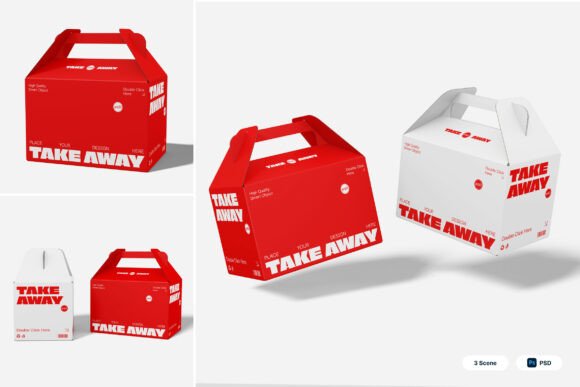
Burger Box Packaging 3D Mockup for Modern Branding
Creating a strong visual identity for your food business has never been more important. With the rise of delivery services and takeaway culture, packaging plays a crucial role in how customers perceive your brand. The Burger Box Packaging 3D Mockup offers a professional, flexible solution for showcasing your burger boxes and other fast-food packaging in a realistic, engaging way. Whether you're a restaurant owner, a graphic designer, or a food entrepreneur, this tool helps bring your packaging concepts to life without the cost and time of physical prototypes.
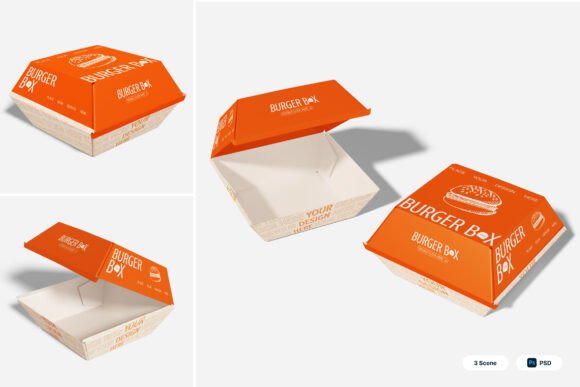
At its core, the Burger Box Packaging 3D Mockup is a digital representation of takeaway food boxes designed with foldable carton structures and presentation angles ideal for branding and marketing visuals. It allows users to place their custom designs onto a realistic 3D model of a burger box, giving clients and collaborators a clear idea of how the final printed product will look in real life. The mockup is especially useful for fast-food branding, delivery campaigns, and promotional materials where visual appeal and brand consistency are key.
Key Features That Make a Difference
One of the standout features of this mockup is its use of smart object layers. By simply double-clicking a layer in Photoshop, you can insert your own design, save it, and instantly see it rendered on the 3D box. This makes the process of visualizing packaging designs fast and intuitive, even for those who aren’t expert designers. The package includes three PSD files, giving you multiple presentation options to choose from based on your project’s needs.
The high-resolution output (4000 x 3000 pixels at 300 dpi) ensures that your visuals are print-ready and suitable for both digital and physical marketing materials. This level of detail is especially important when presenting to clients, printing packaging samples, or using the visuals in promotional content. The included PDF help guide ensures that even first-time users can navigate the files with ease, making the mockup accessible to a wide range of professionals.
Practical Uses Across Industries
The versatility of the Burger Box Packaging 3D Mockup makes it a valuable asset across multiple fields. For restaurant owners and food franchise operators, it provides a way to test out new packaging designs before committing to print, helping ensure that the final product aligns with their brand identity. Designers working on fast food promotions or street food packaging can quickly generate visuals that reflect how the packaging will appear in real-world settings.
For digital marketers and brand strategists, the mockup supports campaign development by allowing them to create high-quality visuals for social media, websites, and advertising materials. These visuals help communicate the brand experience to potential customers, reinforcing recognition and trust. Even educators teaching graphic design or food business courses can use the mockup as a teaching tool to demonstrate how packaging design translates into real-world applications.
Benefits That Enhance Branding and Communication
Using the Burger Box Packaging 3D Mockup brings several key benefits to the table. First, it enhances brand consistency by allowing designers to preview how logos, color schemes, and typography will appear on actual packaging. This ensures that all branding elements work together cohesively before any physical production begins.
Second, it improves client communication. Presenting a realistic 3D mockup is far more effective than showing flat designs or sketches. Clients can visualize the final product more clearly, which reduces back-and-forth revisions and speeds up the approval process. This efficiency is especially valuable in fast-paced environments like food delivery services and promotional marketing campaigns.
Third, the mockup supports cost-effective design testing. Instead of printing multiple physical samples, teams can explore different design variations digitally. This not only saves money but also reduces material waste and speeds up the creative process.
Real-World Applications and Examples
Consider a local burger joint launching a new delivery service. The owner wants packaging that stands out on social media and reinforces the brand’s playful personality. Using the Burger Box Packaging 3D Mockup, the designer can quickly test different color combinations, logo placements, and icon styles to find the most visually appealing option. Once finalized, the same mockup can be used in digital ads and on the restaurant’s website to maintain a consistent look.
Another example is a freelance designer working on a project for a national food franchise. The client needs packaging concepts for a limited-time offer campaign. With the mockup, the designer can create multiple presentation angles and variations that show how the packaging will look in different environments—on a delivery bag, stacked in a restaurant, or opened by a customer. These visuals help the client make informed decisions without needing physical prototypes.
Choosing the Right Tools for Your Needs
When selecting a packaging mockup, it’s important to consider the specific needs of your project. The Burger Box Packaging 3D Mockup is ideal for anyone working with foldable carton structures, especially in the fast-food and delivery sectors. Make sure you have access to Adobe Photoshop, as the smart object layers require it for editing. Also, keep in mind that image stocks are not included, so you may need to source your own background images or textures to enhance the realism of your mockups.
For best results, start with high-quality design files and ensure that your branding elements are well-defined before placing them into the mockup. This will help you achieve the most accurate and professional-looking results. If you're working with a team, share the PSD files and help guide with collaborators to streamline the design and feedback process.
Final Thoughts
In today’s competitive food market, having the right packaging can make all the difference. The Burger Box Packaging 3D Mockup gives you the tools to present your ideas clearly, professionally, and efficiently. Whether you're building a new brand identity, launching a marketing campaign, or simply testing out packaging concepts, this mockup offers a realistic, user-friendly way to bring your vision to life. By saving time, reducing costs, and improving client communication, it’s a valuable addition to any food branding or packaging design workflow.