Enhancing Brand Presentation with Table Tent 3D Mockup
In the competitive landscape of hospitality, retail, and event management, visual presentation plays a crucial role in attracting attention and conveying information effectively. The Table Tent 3D Mockup offers a powerful solution for businesses looking to create professional, eye-catching table displays without the need for physical prototypes. This digital tool enables users to visualize folded tabletop structures in a realistic setting, making it ideal for menus, promotions, event signage, and more.
Understanding the Table Tent 3D Mockup
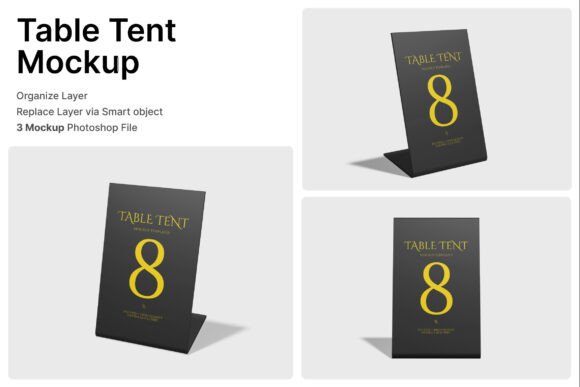
The Table Tent 3D Mockup is a digital asset designed to simulate the appearance of folded table tents in a three-dimensional space. These mockups are especially useful for restaurants, cafes, hotels, and event planners who need to present information in a clean, professional manner. Each mockup includes smart object layers that allow users to easily insert their own designs, ensuring a seamless and realistic preview of the final product.
At its core, the mockup mimics the structure of a physical table tent — a folded piece of cardstock or printed material that stands upright on a table. This format is ideal for displaying menus, pricing, event schedules, and promotional messages in a way that's both functional and visually appealing.
Key Features of the Table Tent 3D Mockup
- Smart Object Layers: One of the most user-friendly aspects of the mockup is its smart object functionality. Users can simply double-click a layer in Photoshop, insert their design, and save — the mockup automatically updates to reflect the new content.
- High-Resolution Output: With a resolution of 4000 x 3000 pixels and 300 dpi, the mockup ensures that final visuals are crisp and suitable for both print and digital use.
- Multiple Viewing Angles: The mockup includes various display angles, allowing users to showcase their table tents from different perspectives. This feature is particularly useful when presenting designs to clients or stakeholders.
- PDF Help Guide: Included with the download is a detailed PDF guide that walks users through the setup and customization process, ensuring even beginners can navigate the tool with ease.
- Three PSD Files: The package includes three separate PSD files, each offering different layout and perspective options to suit a variety of branding needs.
Realistic Presentation for Diverse Applications
One of the standout qualities of the Table Tent 3D Mockup is its versatility. It can be used across a wide range of industries and applications, including:
- Restaurant and Cafe Menus: Displaying menus in an attractive format helps enhance the dining experience and encourages customer engagement.
- Promotional Signage: Whether it's a limited-time offer or a seasonal menu, table tents provide an effective way to draw attention to special deals.
- Event Branding: From weddings to conferences, table tents can be used to label tables, provide seating charts, or share event details in an organized manner.
- Hotel Services: Hotels can use these mockups to present concierge information, dining options, or promotional packages in a clean, professional format.
- Retail Countertop Displays: Retailers can create signage for in-store promotions, product launches, or clearance events without the need for physical prototypes.
Why Use a 3D Mockup Instead of Physical Samples?
While physical table tents are commonly used in business settings, creating physical prototypes can be time-consuming and costly. The Table Tent 3D Mockup offers a cost-effective and efficient alternative that allows for rapid design iteration and presentation. Here are some of the primary advantages:
- Cost Efficiency: Eliminates the need for printing multiple drafts, saving both time and money.
- Quick Revisions: Design changes can be made instantly within the smart object layers, allowing for real-time adjustments and client feedback.
- Professional Visualization: High-resolution outputs and realistic angles make it easier to present designs to clients, investors, or internal teams.
- Brand Consistency: Ensures that all promotional materials align with brand guidelines before going to print.
- Eco-Friendly Option: Reduces paper waste by minimizing the need for printed samples.
Designing for Real-World Use: Tips and Best Practices
To get the most out of the Table Tent 3D Mockup, it's important to consider the end-use environment. Here are some practical tips to enhance your design process:
- Keep It Readable: Ensure text is large enough to be easily read from a short distance. Avoid overly decorative fonts that may reduce legibility.
- Use Contrasting Colors: High contrast between text and background improves visibility, especially in well-lit environments like restaurants or retail counters.
- Focus on Key Information: Prioritize the most important details such as pricing, event names, or contact numbers.
- Match Brand Identity: Incorporate brand colors, logos, and fonts to maintain a cohesive visual identity across all marketing materials.
- Test Different Angles: Use the various PSD files to see how your design appears from different perspectives and choose the most effective presentation style.
Who Benefits Most from the Table Tent 3D Mockup?
The Table Tent 3D Mockup is a valuable tool for a wide range of professionals and businesses. Here are some key user groups that can benefit from integrating this mockup into their workflow:
- Graphic Designers: Allows for quick and accurate client presentations without the need for physical printing.
- Marketing Professionals: Ideal for creating promotional materials that align with broader campaign visuals.
- Restaurant Owners: Enables easy updates to menus and specials without the cost of reprinting.
- Event Planners: Helps visualize signage and branding elements for weddings, conferences, and exhibitions.
- Hotel Managers: Useful for creating consistent in-room and public area signage that reflects the hotel's brand.
Technical Considerations When Using the Mockup
While the Table Tent 3D Mockup is designed to be user-friendly, there are a few technical considerations to keep in mind for optimal results:
- Software Requirements: The mockup is compatible with Adobe Photoshop and requires the latest version for full functionality.
- Image Quality: While the mockup includes smart object layers, it's important to use high-resolution images and graphics to maintain clarity in the final output.
- Layer Management: Familiarize yourself with Photoshop’s layer system to efficiently navigate and edit the provided PSD files.
- Customization Limits: While the mockup allows for design insertion, structural changes to the tent itself (such as altering the fold angle) may not be possible without advanced editing skills.
- Stock Image Usage: Note that any stock images used within the mockup are not included in the download package and must be sourced separately.
Conclusion: A Versatile Tool for Modern Branding Needs
The Table Tent 3D Mockup is more than just a design tool — it's a practical solution for businesses and creatives looking to enhance their visual communication. Whether you're presenting a new menu to a restaurant owner, designing signage for a wedding, or creating promotional displays for a retail space, this mockup provides a realistic, professional way to showcase your ideas. Its combination of high-quality visuals, ease of use, and adaptability across industries makes it an essential asset for anyone involved in branding, marketing, or design presentation.