Exhibition Booth 3D Mockup: A Smart Tool for Trade Show Branding and Event Presentation
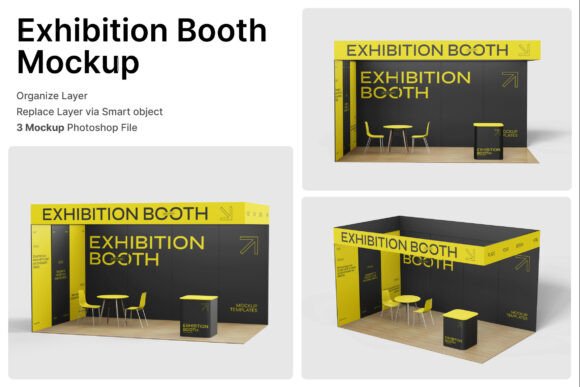
Creating a strong visual presence at trade shows, conventions, and promotional events is essential for any brand looking to stand out. An Exhibition Booth 3D Mockup offers a powerful solution for visualizing and presenting booth designs before they’re built. With detailed structures for walls, counters, seating, and immersive perspectives, this tool helps professionals craft a polished and effective event environment.
Understanding the Value of 3D Mockups for Exhibitions
The Exhibition Booth 3D Mockup is more than just a visual aid—it’s a practical tool for planning and presenting. Whether you're launching a new product, attending a business fair, or setting up a retail exhibition, using a 3D mockup can streamline the design process and improve communication with clients or team members.
These mockups come with smart object layers, allowing users to easily insert their own graphics and see how they look in a realistic setting. The included PSD files and help guide make it accessible even for those with limited design experience. High-resolution output (4000 x 3000 pixels at 300 dpi) ensures that the final visuals are crisp and suitable for presentations or print materials.
Common Mistakes When Choosing or Using Exhibition Booth 3D Mockups
Despite their usefulness, many people make avoidable errors when selecting or working with 3D mockups. These missteps can lead to wasted time, poor visual results, or miscommunication during the planning stages of an event.
1. Overlooking File Compatibility and Required Software
One of the most common issues is not checking whether the mockup files are compatible with your design software. The Exhibition Booth 3D Mockup includes PSD files, which require Adobe Photoshop to edit. Users who don’t have Photoshop or aren’t familiar with its features may struggle to utilize the smart object layers properly.
Better approach: Before downloading or purchasing a mockup, confirm that you have access to the correct software and understand how to use smart layers. If you're not comfortable with Photoshop, consider mockups that offer compatibility with other platforms like Canva or Figma.
2. Ignoring the Need for High-Resolution Output
Some users download mockups without checking the resolution, only to discover later that the final image isn’t suitable for large-format printing or high-quality presentations. Since the Exhibition Booth 3D Mockup offers 300 dpi resolution, it’s ideal for professional use—but only if you use it correctly.
Better approach: Always verify the pixel dimensions and resolution before using a mockup. If you plan to print banners or large signage, ensure the mockup supports that scale without pixelation.
3. Using Stock Images Not Included in the Mockup
Many mockups—including this one—do not include the stock images used in the preview. Users sometimes assume that the images are included, which can lead to confusion or delays in the design process.
Better approach: Read the file description carefully. If stock images aren’t included, plan to source your own or use royalty-free platforms like Unsplash or Pexels to find appropriate visuals.
4. Underestimating Time Required for Customization
While smart object layers simplify the editing process, many users underestimate how long it takes to fine-tune colors, adjust lighting, or align branding elements. This can lead to rushed presentations or mismatched visuals.
Better approach: Build extra time into your design schedule for mockup customization. Use the included help guide to streamline the process and ensure consistency across your booth visuals.
Key Features to Check Before Using an Exhibition Booth 3D Mockup
Before you commit to using any mockup, including the Exhibition Booth 3D Mockup, there are several factors to consider:
- File type and software requirements: Ensure compatibility with your design tools.
- Image resolution: Confirm it meets print or digital display standards.
- Customization flexibility: Check if you can modify lighting, colors, and layout elements.
- License and usage rights: Make sure the mockup can be used for commercial purposes if needed.
- Support materials: Look for included help guides or video tutorials to assist with setup.
How to Avoid Costly Presentation Errors
A poorly executed mockup can misrepresent your brand or confuse your audience. For example, mismatched colors or low-quality images may give the impression of unprofessionalism. In a high-stakes environment like a product launch or corporate event, such errors can impact credibility and engagement.
Realistic example: A startup preparing for a tech convention used a 3D mockup but didn’t adjust the lighting to match their brand’s aesthetic. The final presentation looked flat and didn’t reflect the innovative feel they wanted to convey.
Better approach: Take time to match your brand’s color palette, use high-quality images, and adjust the mockup’s environment settings to reflect the intended atmosphere of your booth. This attention to detail enhances your brand’s visual identity and professionalism.
Maximizing the Benefits of Your Exhibition Booth 3D Mockup
To get the most out of your mockup, follow these practical tips:
- Start with a clear design plan: Know your layout, color scheme, and key messaging before opening the mockup.
- Use the help guide: Follow the provided instructions to make the most of smart object layers and customization options.
- Test different perspectives: Use multiple views to ensure your booth looks great from all angles.
- Review for consistency: Make sure all branding elements—logos, fonts, imagery—are aligned with your brand guidelines.
- Share mockups with your team: Use them as a communication tool to align stakeholders before finalizing designs.
Conclusion
The Exhibition Booth 3D Mockup is a valuable tool for anyone involved in trade shows, conventions, or marketing events. By avoiding common mistakes and taking the time to customize your visuals thoughtfully, you can create a compelling and professional presentation that reflects your brand accurately.
Remember, the goal isn’t just to use a mockup—it’s to use it well. With attention to detail, proper software, and a clear plan, your 3D mockup becomes more than a design tool—it becomes a strategic asset for your brand’s event presence.