MacBook Environment 3D Mockup: Realistic Laptop Presentation Made Easy
Creating professional, visually compelling product presentations is essential for designers, marketers, and entrepreneurs. The MacBook Environment 3D Mockup delivers a powerful solution for showcasing digital products in lifelike settings. Whether you're presenting a UI design, a SaaS platform, or a branding concept, this mockup kit offers a polished and realistic way to visualize your work in context.
What Is the MacBook Environment 3D Mockup?
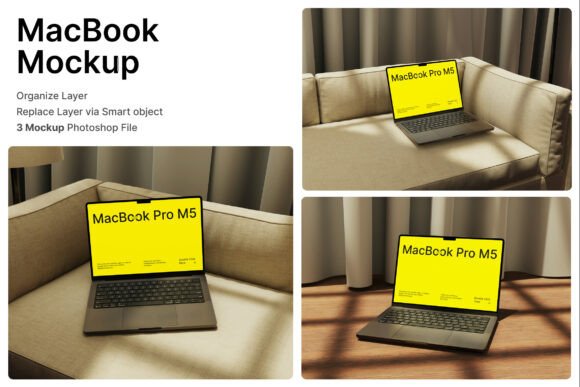
The MacBook Environment 3D Mockup is a collection of high-resolution, editable mockup scenes that allow you to insert your digital designs into realistic interior environments. Each scene includes a MacBook laptop displayed from a natural perspective, making it ideal for website previews, application interfaces, and branding presentations.
With three included PSD files, smart object layers, and a detailed help guide, the process is simple: double-click a layer, insert your design, and save. The mockup is built at 4000 x 3000 pixels with 300 dpi resolution, ensuring print-quality visuals for both digital and physical use.
Creative Possibilities with Realistic Laptop Mockups
This mockup isn't just for static product shots. It opens the door to creative reinterpretation across a variety of visual storytelling formats. Here are a few ways you can use it:
- UI/UX Design Presentations: Show your app or website interface in a real-world context, helping stakeholders envision how users will interact with it.
- Startup Branding Kits: Present your brand’s digital presence by placing your logo, landing page, or dashboard within a clean, modern workspace.
- SaaS Promotions: Use the mockup to demonstrate your software interface in a lifestyle setting, appealing to potential customers emotionally and visually.
- Developer Portfolios: Display your latest web or app builds in a realistic environment to elevate your professional image.
- Digital Marketing Assets: Create high-quality social media posts, banners, and landing page visuals that reflect a premium brand tone.
Who Can Benefit from This Mockup?
The MacBook Environment 3D Mockup is designed for a wide range of creative professionals and businesses. Here's how different users can apply it effectively:
Designers
UI/UX designers can use the mockup to present their work in a realistic setting, making it easier for clients to understand the user experience. The smart object layers allow for quick design swaps, saving time during revisions and client presentations.
Marketers
Marketing professionals can leverage the mockup to create campaign visuals that feel authentic and aspirational. Whether promoting a new app or a digital product, placing the design in a natural environment enhances relatability and visual appeal.
Entrepreneurs
Startups and small business owners can use the mockup to showcase their digital offerings without needing professional photography. It's an affordable, scalable way to present products on landing pages, pitch decks, and investor presentations.
Educators and Creators
Online course creators, bloggers, and educators can use the mockup to demonstrate digital tools, software, or workflows in a visually engaging way. It helps learners better understand how to apply what they're learning in real-world scenarios.
How to Use the MacBook Environment 3D Mockup Effectively
To get the most out of this mockup, consider the following tips:
- Match the Scene to Your Brand Aesthetic: Choose the environment that best reflects your brand’s tone—minimalist, tech-focused, cozy, or professional.
- Keep Your Design Clean: Since the mockup includes interior elements, avoid overly complex designs that might clash or distract from the main content.
- Use Consistent Lighting: Ensure your design’s lighting and color scheme harmonize with the mockup’s environment for a seamless look.
- Experiment with Layouts: Try different screen orientations and design placements to find the most visually appealing composition.
- Customize the Background: If you want a more branded look, subtly adjust the background colors or add branded elements like notebooks or devices.
Real-World Applications and Examples
Let’s look at a few practical examples of how the MacBook Environment 3D Mockup can be used in real projects:
- Portfolio Website: A freelance web designer uses the mockup to show a before-and-after version of a client’s site, placed in a modern home office setting.
- Product Landing Page: A SaaS startup integrates the mockup into their landing page to display the dashboard of their analytics tool, giving visitors a realistic preview.
- Instagram Post: A UI designer posts a mockup of their latest app interface on social media, using the environment to suggest a productive, creative lifestyle.
- Email Campaign: A digital marketing agency uses the mockup to show clients how their new website will appear on a laptop in a natural setting, increasing client confidence.
Maximizing Clarity and Impact
When using the MacBook Environment 3D Mockup, clarity should be a priority. Here’s how to ensure your visuals remain effective and audience-friendly:
- Avoid Overloading the Scene: Keep the focus on your design by minimizing unnecessary visual elements in the environment.
- Use High-Contrast Designs: Ensure your content stands out clearly against the background and laptop frame.
- Maintain Consistent Branding: Use fonts, colors, and logos that align with your brand identity to maintain visual cohesion.
- Test Across Formats: Preview your mockup on different screen sizes and platforms to ensure it looks great everywhere.
Conclusion: Elevate Your Visual Presentations
The MacBook Environment 3D Mockup is more than a presentation tool—it’s a way to elevate your creative output and communicate ideas with clarity and style. Whether you're a designer, marketer, or entrepreneur, this mockup helps you showcase your work in a way that feels real, professional, and engaging.
By integrating your digital designs into realistic environments, you not only enhance visual appeal but also build stronger connections with your audience. With its smart object layers, high-resolution detail, and flexible use cases, this mockup is a valuable asset for any creative project that demands a polished, professional look.