Napkin 3D Mockup: Realistic Table Designs for Branding and Presentation
When it comes to visual branding for restaurants, cafes, or special events, presentation matters more than ever. The Napkin 3D Mockup is a creative tool that helps designers and business owners visualize how folded napkins will look in real-life dining settings. Whether you're working on restaurant branding, packaging concepts, or promotional materials, this mockup gives you a realistic preview of how your napkin designs fit into a complete table setting.
What Is Napkin 3D Mockup?
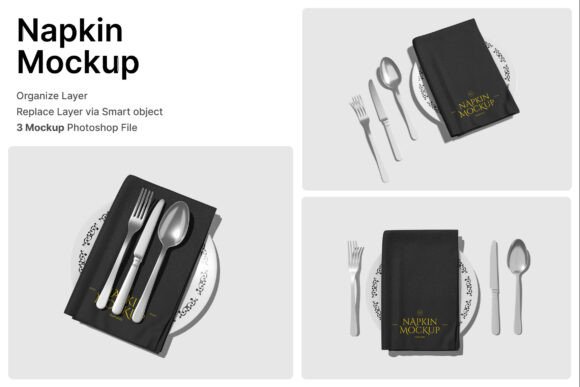
The Napkin 3D Mockup is a digital design resource that allows users to insert their napkin artwork into lifelike table arrangements. It includes three high-quality PSD files featuring smart object layers, making it easy to customize and update designs. With just a few clicks, you can replace the default napkin graphics with your own and instantly see how they look alongside plates, cutlery, and other tabletop elements.
Each mockup is created at a resolution of 4000 x 3000 pixels with 300 dpi, ensuring crisp and professional results for both digital and print use. A PDF help guide is also included to walk users through the setup process, especially for those who are new to working with Photoshop files.
Why Use Napkin 3D Mockup?
Visualizing how a design will appear in a real-world setting can be challenging without the right tools. The Napkin 3D Mockup bridges that gap by offering a quick and professional way to showcase napkin designs in context. This is especially valuable for restaurant owners, event planners, and graphic designers who need to present polished visuals to clients or stakeholders.
- Save time by avoiding physical photoshoots or complex 3D modeling.
- Present ideas clearly to clients, team members, or vendors.
- Experiment with layouts and design variations before finalizing.
Because the mockup includes smart object layers, users can easily place their artwork without needing advanced Photoshop skills. Just double-click the layer, insert your design, save, and see the updated mockup instantly.
Where Can You Use Napkin 3D Mockup?
The versatility of the Napkin 3D Mockup makes it useful across a wide range of industries and creative projects. Here are some common applications:
Restaurant Branding
Restaurants often use custom napkins as part of their visual identity. With this mockup, you can show how your logo or pattern looks on napkins placed at a dining table. This helps restaurant owners visualize the overall ambiance and ensure their branding aligns with their theme.
Wedding and Event Planning
Wedding planners and event coordinators can use the mockup to present table designs to clients. It allows them to show different napkin folding styles and color schemes in a realistic setting, helping clients make informed decisions about their event decor.
Product Packaging and Kitchenware Branding
If you're launching a line of premium napkins, tableware, or kitchen accessories, the mockup can help you create professional product visuals. You can showcase how your napkins look in a styled dining environment, which is especially useful for online stores or marketing materials.
Graphic Design and Marketing
Designers can use the Napkin 3D Mockup to create portfolio pieces or present mockups to clients. It’s also a great tool for social media marketing—showcasing your designs in real-life contexts can significantly boost engagement and perceived quality.
How to Get the Most Out of Napkin 3D Mockup
While the mockup is user-friendly, there are a few tips to keep in mind to make the most of it:
- Use high-quality artwork. Since the mockup is high-resolution, your design should match that quality to ensure a realistic look.
- Align your design with the napkin shape. The smart object layers are pre-shaped, so make sure your artwork fits within the visible area.
- Customize the background if needed. While the included table settings are realistic, you can adjust lighting or background elements in Photoshop to better match your brand or event style.
- Check the help guide. If you're new to using smart object layers, the included PDF offers step-by-step instructions to get started quickly.
What to Consider Before Using This Mockup
Before downloading or purchasing the Napkin 3D Mockup, it's important to understand what’s included and what’s not:
- Only PSD files are provided—you'll need Adobe Photoshop or a compatible editor to use them.
- Image stock is not included. Any photos or textures shown in the preview are for demonstration only and must be sourced separately.
- It’s ideal for beginners and pros alike, but some basic Photoshop knowledge helps with customization.
If you're looking for a ready-to-use solution for showcasing napkin designs, this mockup is a smart investment. It saves time, looks professional, and helps bring your ideas to life without the need for physical setups or expensive photography.
Final Thoughts
The Napkin 3D Mockup is more than just a design tool—it's a practical way to visualize and present napkin designs in a variety of real-world scenarios. Whether you're designing for a restaurant, planning a wedding, or building a product brand, this mockup helps you communicate your vision clearly and professionally.
By offering high-resolution visuals, smart object layers, and a user-friendly format, it supports both creative exploration and confident client presentations. If you're involved in hospitality design, food service branding, or graphic design for tabletop products, this mockup is worth adding to your toolkit.