Understanding the Power of Folder 3D Mockup for Professional Branding and Presentation
In today’s visually driven business world, the way you present your documents can make a lasting impression. Whether you're preparing a company profile, a proposal, or a presentation kit, the presentation matters just as much as the content. That’s where a Folder 3D Mockup comes into play. It offers a realistic, high-quality way to showcase your designs in a professional context without the need for expensive photoshoots or physical prototypes.
What Is a Folder 3D Mockup?
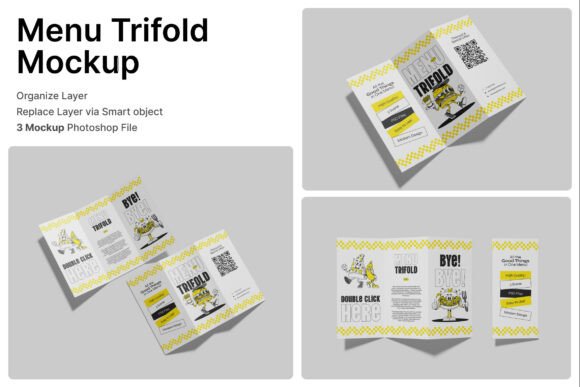
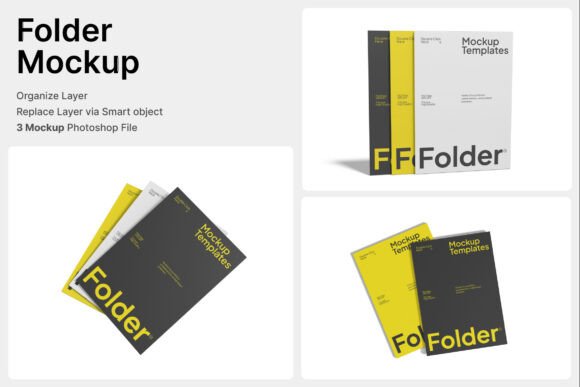
A Folder 3D Mockup is a digital template that allows designers and businesses to visualize how their printed or branded documents will look in real-life settings. These mockups are typically created using advanced 3D rendering techniques and come in formats like PSD (Photoshop Document), which enables easy customization through smart object layers.
With a Folder 3D Mockup, users can insert their designs into pre-made 3D scenes that mimic real-world environments—such as office desks, stacked documents, or corporate folders on a conference table. This helps in evaluating the aesthetics and effectiveness of branding materials before they are printed or distributed.
Key Features of Folder 3D Mockups
Folder 3D Mockups come with a variety of features designed to streamline the design process and enhance presentation quality. Here are some of the most notable features:
- Smart Object Layers: Simply double-click the layer, insert your design, and save. This non-destructive editing feature ensures your original files remain intact while allowing for quick updates.
- High-Resolution Output: With a resolution of 4000 x 3000 pixels and 300 dpi, these mockups are print-ready and suitable for both digital and physical presentations.
- Multiple PSD Files: The package usually includes three PSD files, each offering a different angle or scene to present your folder design from various perspectives.
- PDF Help File Included: A detailed guide is provided to help users navigate the layers and customize the mockup with ease, even if they’re not Photoshop experts.
Why Folder 3D Mockups Are Essential for Modern Businesses
Professional branding extends beyond logos and color schemes—it includes every tangible and digital touchpoint a customer or client interacts with. Folder 3D Mockups provide a crucial advantage by allowing businesses to preview how their branding will appear on physical items like folders, proposal covers, and presentation kits.
Here’s why they are becoming a staple in modern design and business practices:
- Cost-Effective Presentation: Eliminates the need for physical prototypes, saving time and money.
- Enhanced Client Communication: Presenting a realistic mockup helps clients visualize the final product, improving feedback and approval processes.
- Consistency Across Materials: Ensures that all branded documents align with the company’s visual identity before printing.
- Quick Iteration: Easy to update and modify, allowing for rapid design iterations based on stakeholder input.
Practical Applications of Folder 3D Mockups
Folder 3D Mockups are versatile tools that cater to a wide range of industries and use cases. Below are some of the most common applications:
1. Corporate Stationery and Office Branding
From internal memos to client-facing reports, branded folders help reinforce company identity. A 3D mockup allows businesses to preview how their logo, tagline, and colors will appear on folders used in daily office operations.
2. Proposal Covers and Presentation Kits
When pitching to clients or investors, a well-designed proposal cover can make a significant difference. Using a mockup, designers can simulate how the folder looks when placed on a table during a presentation, giving a more immersive sense of the final product.
3. Educational Documents and Institutional Materials
Schools, colleges, and training institutions often use branded folders for course materials, certificates, and handouts. A 3D mockup helps ensure that the design is both professional and aligned with the institution’s branding standards.
4. Print Services and Office Supplies
Print shops and office supply vendors can use Folder 3D Mockups to showcase their product offerings to potential clients. By offering a realistic preview, they can attract more customers and reduce the need for physical samples.
How to Use Folder 3D Mockups Effectively
While Folder 3D Mockups are user-friendly, there are best practices to follow to get the most out of them:
- Start with High-Quality Designs: Ensure your artwork is in the correct format (usually PNG or JPG) and at a high resolution to maintain clarity in the mockup.
- Experiment with Angles: Use all three PSD files to present your design from different perspectives, such as front, side, and angled views.
- Customize the Scene: Some mockups allow for background changes or the addition of other elements like pens, business cards, or laptops to create a more engaging scene.
- Review with Stakeholders: Share the mockup with team members or clients to gather feedback before finalizing the design for print.
Common Misconceptions About Folder 3D Mockups
Despite their usefulness, some people still hesitate to use Folder 3D Mockups due to common misconceptions. Here are a few myths debunked:
- “Only for Designers with Advanced Skills”: While some familiarity with Photoshop helps, the smart object feature makes it accessible even for beginners.
- “Not Suitable for Print”: With a resolution of 300 dpi and 4000 x 3000 pixels, these mockups are absolutely print-ready.
- “Limited to One Type of Folder”: Many mockups offer variations in color, texture, and layout, allowing for a wide range of customization options.
Incorporating Folder 3D Mockups Into Your Workflow
Whether you're a freelance designer, a marketing professional, or a business owner, integrating Folder 3D Mockups into your workflow can streamline your design process and elevate your final output. Here's how:
- Design Phase: Use the mockup as a reference while designing to ensure alignment with the final presentation.
- Review Phase: Share the mockup with clients or team members to gather feedback before printing.
- Pitching and Presentations: Use the rendered mockup in digital presentations or on your portfolio website to showcase your work professionally.
- Print Preparation: Once approved, the design can be sent directly to print with confidence in its appearance.
Conclusion: Elevate Your Branding with Folder 3D Mockups
In a competitive business landscape, standing out often comes down to the details. Folder 3D Mockups offer an accessible, efficient, and visually compelling way to present your branded materials. Whether you're preparing for a client meeting, a conference, or a print run, these mockups help ensure that your documents look polished and professional before they ever reach the printer.
By leveraging the included PSD files, smart object layers, and high-resolution output, you can create stunning visualizations that not only impress your audience but also streamline your design process. As more businesses shift toward digital-first workflows, the ability to create realistic, high-quality previews of physical materials is more important than ever.
So, whether you're a designer looking to enhance your portfolio or a business aiming to strengthen your brand presence, a Folder 3D Mockup is a valuable tool worth incorporating into your toolkit.