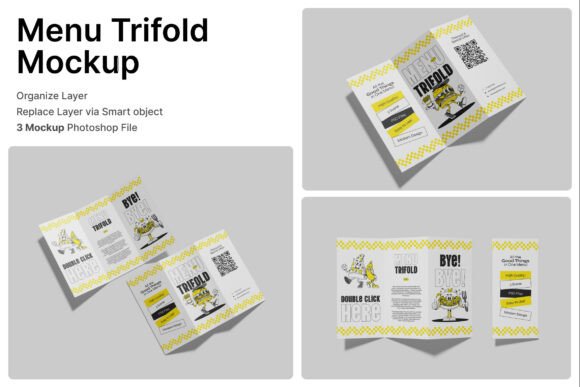
Menu Trifold 3D Mockup: A Practical Tool for Restaurant Branding and Presentation
Creating a visually compelling menu is a crucial part of restaurant and food business branding. The Menu Trifold 3D Mockup offers a professional and efficient way to visualize how a printed menu will appear in real-world settings. Whether you're designing for a café, fine dining establishment, or fast-food outlet, this mockup helps bridge the gap between concept and final product.
Unlike flat design previews, this tool provides a three-dimensional representation of a folded menu. It allows designers and business owners to evaluate layout, color balance, and typography in a realistic context. This level of detail supports better decision-making before production, reducing costly revisions later in the process.
How the Menu Trifold 3D Mockup Fits Into the Design Workflow
In a typical design project, mockups serve as a presentation layer that follows the actual layout creation. The Menu Trifold 3D Mockup becomes especially useful after the initial design phase, when you're ready to review how your menu will appear in physical form. It integrates seamlessly with Adobe Photoshop through smart object layers, making it easy to update and customize designs without altering the mockup structure.
For restaurant owners and marketers, this tool can be used during client presentations or internal reviews to communicate how the final printed piece will look. It also supports better alignment between designers, printers, and stakeholders by providing a shared visual reference point.
Using the Mockup Before, During, and After Design
Before diving into full-scale design, the Menu Trifold 3D Mockup can help establish expectations. Showing a sample layout in 3D format helps clients or team members understand the format and visual impact of a trifold menu. This can guide early-stage decisions about content hierarchy, branding elements, and overall style.
During the design process, the mockup serves as a dynamic preview tool. By placing your artwork into the smart object layers, you can instantly see how design choices translate into a realistic format. This includes evaluating how fold lines affect readability and whether key elements remain prominent in both open and closed views.
After the design is complete, the mockup becomes a presentation asset. It can be used in digital portfolios, marketing materials, or printed samples to demonstrate your brand’s visual identity in a tangible format. This is especially valuable for freelancers, agencies, and in-house designers who need to show their work in context.
Integration with Other Tools and Resources
The Menu Trifold 3D Mockup works best when combined with a solid design workflow. It's built for Adobe Photoshop, which means it integrates well with other Adobe Creative Cloud tools like Illustrator and InDesign. Designers can create vector assets in Illustrator, layout the menu in InDesign, then import the final design into the mockup for presentation.
For teams using project management tools like Trello, Asana, or Figma for collaboration, the mockup can be exported as a high-resolution image and shared as a deliverable or checkpoint. This makes it easier to align creative and non-creative stakeholders around a final product.
Additionally, the mockup supports a streamlined review process with clients or internal teams. By generating realistic visuals quickly, it reduces the need for physical prototypes, saving both time and materials in the early stages of a project.
Practical Tips for Using the Menu Trifold 3D Mockup
- Start with a clear design layout: Make sure your menu design is well-structured before placing it into the mockup. This ensures that the 3D preview accurately reflects your intentions.
- Use smart objects effectively: Double-click the designated layers to edit your design directly within the mockup. This preserves the mockup's integrity while allowing full customization.
- Preview both open and closed views: The mockup includes variations for open and closed arrangements. Use both to ensure consistency and impact across different viewing angles.
- Export for multiple uses: Save your mockup in different resolutions for digital and print use. High-resolution exports are ideal for client presentations and print samples.
- Organize your files: Keep your PSD files labeled and stored in a logical folder structure to streamline future updates or reuse.
Compatibility and Usability Considerations
The Menu Trifold 3D Mockup is delivered as a layered Photoshop file with smart objects, making it compatible with Photoshop CC and later versions. Users should ensure they have the latest version of Photoshop installed to take full advantage of its features.
While the mockup includes a PDF help guide, basic knowledge of Photoshop layers and smart objects is recommended. This ensures smooth integration into your existing design process without unnecessary delays.
One important note is that stock images are not included in the package. Designers should replace placeholder images with their own visuals to create a fully branded mockup. This requires access to high-quality food photography or graphic assets that align with the brand aesthetic.
Quality Control and Long-Term Use
Because the Menu Trifold 3D Mockup is designed at 4000 x 3000 pixels with 300 dpi resolution, it maintains clarity even when printed or scaled for digital use. This ensures that the mockup remains a reliable asset across multiple projects and timeframes.
For businesses or designers who frequently update their branding or menu offerings, keeping a library of mockups—including this one—can significantly reduce production time. Reusing mockups with updated content helps maintain visual consistency while streamlining the design process.
When using the mockup across different projects, consider creating a naming convention or versioning system. This helps avoid confusion and ensures that the correct files are used for each client or menu version.
Real-World Applications Across Industries
The versatility of the Menu Trifold 3D Mockup makes it suitable for a wide range of applications beyond traditional restaurants. Here are a few examples:
- Catering services: Present full-service menus to clients in a format that mimics printed brochures.
- Food trucks and pop-up vendors: Showcase seasonal or limited-time offerings with professional mockups.
- Hotel and hospitality: Display in-room dining menus or event catering options with a polished look.
- Print and packaging design: Use the mockup as a reference for print-ready files and layout specifications.
- Digital marketing: Share high-quality mockup images on social media or websites to promote new menu items or rebranding efforts.
Each of these use cases benefits from the mockup’s ability to convey professionalism and attention to detail. Whether you're pitching to a client or presenting to an internal team, the visual clarity of a 3D mockup can make a significant difference in how your design is received.
Final Thoughts on Integrating the Menu Trifold 3D Mockup
Incorporating the Menu Trifold 3D Mockup into your design or branding workflow doesn’t require a major shift in tools or processes. Its value lies in its simplicity, compatibility, and realism. By offering a tangible preview of your menu design, it helps streamline decision-making, reduce revisions, and improve overall presentation quality.
Whether you're a solo designer, part of a creative agency, or managing a restaurant brand, this mockup is a practical asset that supports both creative exploration and professional execution. With its high resolution, layered structure, and intuitive smart object functionality, it’s a reliable tool for anyone looking to bring their menu concepts to life in a realistic and impactful way.