Valentine Envelope 3D Mockup: A Practical Tool for Romantic Branding and Stationery Design
Understanding the Valentine Envelope 3D Mockup
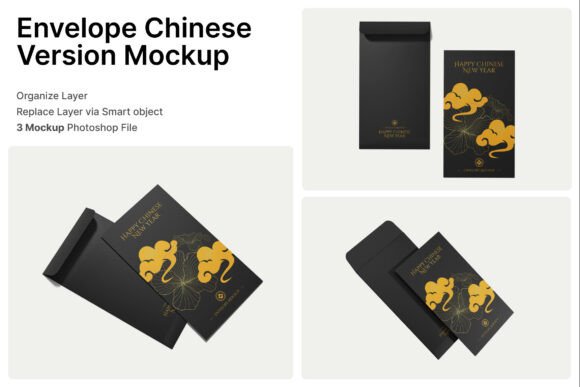
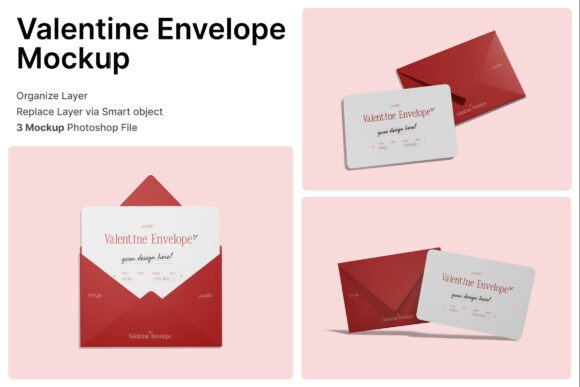
The Valentine Envelope 3D Mockup is a digital design tool that allows creators to visualize how their stationery, greeting cards, and packaging will look in a realistic setting. This mockup includes three PSD files, each offering a different presentation of an envelope and its contents. Designed with smart object layers, it enables users to easily insert their artwork, adjust placement, and generate high-quality visuals for marketing or client presentations.
Each file supports customization through simple layer editing—just double-click a layer, place your design, and save. The package also includes a PDF help guide to assist users through the process. With a resolution of 4000 x 3000 pixels at 300 dpi, the mockup ensures clarity and print-readiness for professional use.
Why Designers and Brands Might Consider This Mockup
For businesses and designers in the stationery, wedding, or seasonal product markets, presenting designs in a realistic format is essential. The Valentine Envelope 3D Mockup provides a fast and effective way to showcase envelope-based products without the need for physical prototypes or photo shoots.
This mockup is particularly useful for:
- Romantic stationery branding
- Wedding invitation design previews
- Valentine’s Day promotional materials
- Anniversary or event invitation mockups
- Floral and gift packaging design
It allows users to create polished visuals that reflect the structure and layout of a real envelope, including how the card insert appears inside. This realism can be crucial for impressing clients or finalizing product visuals for online sales.
Key Benefits of Using the Valentine Envelope 3D Mockup
There are several practical advantages to using this mockup, especially for those who need to present stationery or packaging designs efficiently.
- Time-saving: Avoid the need for physical prototypes or complex photo editing. The smart object layers streamline the design insertion process.
- Professional results: High-resolution output ensures that visuals are suitable for print, digital marketing, and client presentations.
- Versatile use: The mockup works well for multiple niches, including love letters, greeting cards, and seasonal packaging.
- Easy customization: No advanced 3D modeling skills are required—just basic Photoshop knowledge to edit smart layers.
These benefits make the Valentine Envelope 3D Mockup a strong option for designers who need consistent, high-quality visualizations without the overhead of live photography or 3D rendering software.
Tradeoffs and Considerations
While the mockup offers many advantages, it's important to understand its limitations and what users should expect before purchasing or using it.
- Photoshop dependency: Since the files are in PSD format, users must have Adobe Photoshop or compatible software to make edits. Those unfamiliar with Photoshop may need to invest time in learning the basics.
- Image stock not included: All visual content inside the mockup (like background textures or floral graphics) is for demonstration only and not part of the package. Users will need to provide their own design assets.
- Limited to envelope-based designs: While versatile within its niche, this mockup is specifically tailored for envelope and card presentations. It may not suit broader packaging or product visualization needs.
These considerations are important when evaluating whether the Valentine Envelope 3D Mockup aligns with your project scope and technical capabilities.
When This Mockup Is a Strong Fit
The Valentine Envelope 3D Mockup shines in specific use cases where visual accuracy and romantic presentation are key. It’s ideal for:
- Stationery designers: Especially those creating Valentine’s Day or love-themed products.
- Wedding invitation brands: Looking to show how the final product will appear in hand.
- Online retailers: Selling greeting cards or gift packaging and needing lifestyle visuals for product listings.
- Marketing teams: Preparing seasonal campaigns that require polished envelope mockups quickly.
If your project involves envelope-based designs and you need a fast, professional way to present them, this mockup can be a valuable asset.
When Alternatives May Be Worth Considering
Despite its strengths, there are situations where another type of mockup or design tool might better serve your needs:
- Broader product visualization: If you need to showcase boxes, tags, or other packaging types, a more general packaging mockup suite might be more appropriate.
- Non-Adobe workflows: Designers using only Canva, Figma, or other non-PSD tools may find compatibility issues.
- Custom 3D rendering needs: For highly specific lighting, angles, or animation, 3D modeling software like Blender or Cinema 4D may offer more control.
Before committing to the Valentine Envelope 3D Mockup, assess whether your workflow and project scope align with its format and features.
Making the Right Choice for Your Design Needs
Selecting the right mockup tool depends on your goals, technical setup, and the type of design work you do. The Valentine Envelope 3D Mockup is best suited for those who:
- Create envelope or card-based designs
- Need high-quality visuals for marketing or client review
- Have access to Photoshop or are willing to learn basic editing
- Value time efficiency and realistic presentation
On the other hand, if your work involves more complex packaging, 3D renderings, or you're using alternative design platforms, it may be worth exploring other tools or mockup bundles that better match your workflow.
Final Thoughts
The Valentine Envelope 3D Mockup offers a practical solution for designers and brands needing to present romantic or seasonal stationery in a realistic, professional format. With its high resolution, smart object layers, and multiple presentation options, it simplifies the process of visualizing envelope-based designs.
However, like any design tool, it’s important to evaluate whether it fits your specific needs. Consider your design workflow, the type of projects you handle, and your familiarity with Photoshop before deciding. When used effectively, this mockup can enhance your creative output and streamline your presentation process, especially during peak seasons like Valentine’s Day or wedding planning periods.