Orange Box 3D Mockup: Fresh Food Branding Made Simple
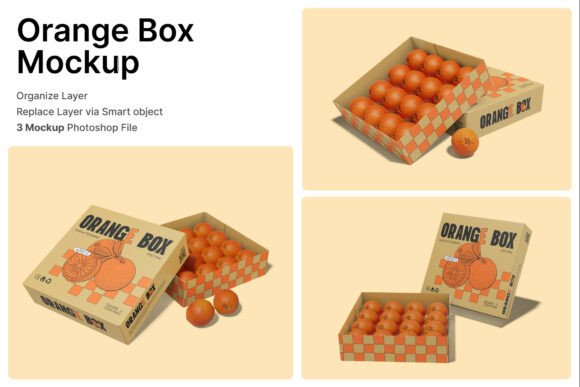
The Orange Box 3D Mockup is a powerful tool for anyone involved in fresh food branding, agricultural packaging, or produce marketing. Designed to showcase citrus packaging, organic produce, and grocery product displays, this mockup brings a professional edge to your packaging presentations. Whether you're a small farmer looking to brand your harvest or a marketer preparing a campaign for supermarket displays, the Orange Box 3D Mockup helps visualize your designs in a realistic context.
With three included PSD files and smart object layers, the mockup makes it easy to insert your designs and instantly see how they’ll look in a real-world setting. It’s especially useful for creating compelling visuals for farmers markets, food retail packaging, and agricultural exports. However, like any design tool, there are common pitfalls users should be aware of before diving in.
Common Mistakes When Using the Orange Box 3D Mockup
Many users jump into the mockup without fully understanding its structure or limitations. This can lead to wasted time, subpar visuals, or misaligned branding. Here are some of the most frequent issues and how to avoid them:
1. Not Reviewing the Help Guide First
One of the most overlooked resources is the included PDF help file. Some users dive straight into the PSD files without reading instructions, which can lead to confusion about how to properly use smart object layers. As a result, they may struggle with placing their designs correctly or not realize how to adjust lighting and perspective for a more realistic outcome.
Better approach: Take 10 minutes to go through the help guide. It walks you through the basic setup, layer organization, and best practices for inserting your artwork. This small step can save you a lot of time and improve the quality of your final presentation.
2. Expecting Stock Images to Be Included
While the Orange Box 3D Mockup includes high-quality arrangements of fruits and produce, it's important to note that the image stock used inside is not part of the downloadable package. Some users mistakenly believe they’ll get access to all the photos shown in the preview, only to find they need to source or create their own visuals.
Better approach: Plan ahead. If you don’t already have high-resolution images of citrus fruits, leafy greens, or other produce, make sure you have access to stock photography or a good camera setup before starting your project.
3. Ignoring Resolution and DPI Settings
The Orange Box 3D Mockup is designed at 4000 x 3000 pixels with a 300 dpi resolution—perfect for print and digital use. However, some users scale the mockup beyond its intended size or export it at a lower resolution for web use without adjusting settings properly. This can lead to blurry or pixelated visuals.
Better approach: Always check your output settings. If you're using the mockup for print, stick to the original resolution. For digital use, consider saving a separate optimized version at 72 dpi to keep file sizes manageable without sacrificing clarity.
4. Misunderstanding Smart Object Functionality
Smart object layers are one of the most useful features of the Orange Box 3D Mockup. They allow you to place your design once and have it automatically conform to the box’s shape and perspective. But if you're unfamiliar with how smart objects work in Photoshop, you might accidentally rasterize layers or flatten your file too early, making future edits difficult.
Better approach: Double-click the smart object layer, insert your design on the new layer that opens, and save it. Keep your original file intact and avoid flattening unless you're ready to export your final image. This preserves flexibility for future changes.
What to Check Before Downloading or Buying
Before committing to the Orange Box 3D Mockup, there are a few key points to consider:
- Compatibility: Ensure the PSD files are compatible with your version of Photoshop. Most modern versions support smart objects, but it’s worth verifying.
- Usage rights: Confirm whether the mockup is free for personal or commercial use. Some platforms may require attribution or have licensing restrictions.
- File size: The high-resolution files can be large. Make sure your system can handle them smoothly, especially if you're working on multiple projects at once.
Realistic Use Cases for the Orange Box 3D Mockup
Understanding how others use the Orange Box 3D Mockup can help you make the most of it. Here are a few practical examples:
- Farmers Market Branding: A local grower can insert their logo and design onto the mockup to create promotional images for social media or packaging labels.
- Supermarket Displays: Retailers can test how different packaging layouts look before printing physical samples, saving time and resources.
- Organic Produce Campaigns: Marketers can create visually appealing mockups for digital ads or packaging prototypes that align with the brand’s eco-friendly messaging.
Choosing the Right Tools for the Job
While the Orange Box 3D Mockup is a great asset, it’s not the only one out there. When comparing mockups, consider the following factors:
- Customization: Does the mockup allow for easy editing of colors, textures, and layout? The Orange Box 3D Mockup offers flexibility through smart layers.
- Quality: Look for high-resolution files that maintain clarity at different zoom levels.
- Support: Check if the provider offers support or updates. Some mockups come with ongoing improvements or customer service for troubleshooting.
Final Thoughts
The Orange Box 3D Mockup is an excellent choice for anyone looking to elevate their fresh food packaging or agricultural branding. Its realistic presentation, ease of use, and high-resolution output make it a valuable tool for professionals and beginners alike. By avoiding common mistakes—like skipping the help guide or expecting stock images to be included—you can maximize its potential and streamline your design process.
Always take a moment to understand what you're working with before diving in. A small investment in learning how to use the mockup properly can lead to much better results and a more satisfying design experience. Whether you're presenting to a client, launching a product line, or building your brand, the Orange Box 3D Mockup gives you the tools to do it with confidence.