Gallery Screen 3D Mockup: A Practical Tool for Professional Visual Presentations
Understanding the Gallery Screen 3D Mockup
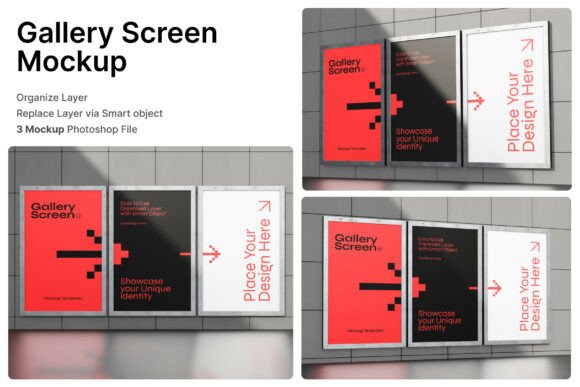
The Gallery Screen 3D Mockup is a digital asset designed for professionals who need to present visual content in a realistic, high-quality format. It offers a collection of wall-mounted display frames that simulate real-world exhibition environments. Whether you're showcasing digital artwork, advertising materials, or promotional posters, this mockup provides a clean and modern way to visualize how your content will appear in a physical setting.
Each mockup file includes three PSD templates that allow for easy customization through smart object layers. This feature simplifies the process of inserting your designs—just double-click the layer, place your artwork, and save. The result is a polished, photorealistic presentation that enhances client proposals, portfolio showcases, and marketing materials.
Who Benefits Most from This Mockup?
- Graphic designers who need to present poster layouts or digital illustrations in a gallery-style setting
- Art directors preparing visuals for museum campaigns, cinema posters, or cultural event promotions
- Marketing professionals developing branded displays for retail or public advertising spaces
- Freelancers and creatives looking to elevate their online portfolios with realistic visualizations
Its versatility makes it ideal for a wide range of creative industries, particularly those that rely on visual storytelling and high-impact presentations. The mockup’s ability to replicate real-world lighting and framing conditions ensures that designers can preview how their work will appear in actual display environments.
Key Features and Technical Specifications
The Gallery Screen 3D Mockup includes three layered PSD files, each offering a unique framing and layout option. These files are built with smart object layers, allowing for seamless integration of custom designs. Users can easily replace the placeholder images with their own artwork without altering the overall perspective or lighting of the scene.
Additional features include:
- High-resolution output (4000 x 3000 pixels, 300 dpi) suitable for print and digital use
- PDF help guide for step-by-step instructions on using the mockup effectively
- Multiple viewing angles and framing styles to suit different presentation needs
It’s important to note that the package does not include any image stock used in the preview scenes. Users must supply their own visuals to insert into the smart object layers. This allows for full creative control while maintaining the integrity of the mockup’s design environment.
Usability and Workflow Integration
One of the most compelling aspects of the Gallery Screen 3D Mockup is its ease of use. The smart object functionality streamlines the design process, making it accessible even to those with limited Photoshop experience. For professionals working under tight deadlines, this efficiency can be a significant advantage.
The mockup’s compatibility with Adobe Photoshop ensures that it fits seamlessly into existing design workflows. Designers can quickly generate presentation-ready visuals without needing to switch tools or learn new software. Additionally, the high-resolution output ensures that the final images maintain clarity and detail, whether used in digital presentations or printed media.
However, users should be aware that the mockup’s realism depends on the quality of the inserted content. Low-resolution or poorly composed images may not render as effectively within the 3D environment. Therefore, it's recommended to use high-quality visuals to maintain the mockup’s professional appearance.
Practical Applications and Real-World Use Cases
For creative studios pitching new branding concepts to clients, the Gallery Screen 3D Mockup offers a way to visualize how a design will appear in a real-world setting. This helps clients better understand the proposed aesthetic and can lead to faster approvals and fewer revisions.
Event planners and retail marketers can use the mockup to preview promotional signage, ensuring that it aligns with the overall visual identity of a campaign or venue. Similarly, independent artists can showcase their digital work in a simulated gallery format, which is especially useful for online portfolios or virtual exhibitions.
In educational settings, design instructors can use the mockup to demonstrate how different compositions appear in a curated space, helping students understand spatial relationships and presentation techniques.
Quality and Presentation Consistency
The Gallery Screen 3D Mockup maintains a high standard of quality across all included files. Each PSD template is meticulously crafted to provide accurate lighting, depth, and perspective. This consistency is crucial for professionals who need to present multiple design variations within the same visual framework.
The mockup’s clean, minimalist aesthetic ensures that the focus remains on the inserted content rather than the background environment. This neutrality makes it adaptable to a wide range of design styles, from contemporary digital art to traditional poster formats.
Long-Term Value and Flexibility
While the mockup is specifically designed for gallery and exhibition-style displays, its flexibility allows it to be repurposed for other applications. For example, it can be used to visualize digital signage in corporate environments or to create mockups for mobile app interfaces displayed on framed screens.
Given its reusable nature and compatibility with common design software, the Gallery Screen 3D Mockup represents a valuable long-term asset for creative professionals. Its ability to produce consistent, high-quality visuals means it can be used repeatedly across different projects without diminishing effectiveness.
Final Considerations and Recommendations
If you're a designer, marketer, or creative professional who frequently needs to present visual content in a realistic setting, the Gallery Screen 3D Mockup is a worthwhile investment. It simplifies the process of creating professional mockups while maintaining a high standard of visual quality.
However, it’s important to evaluate your specific needs before purchasing. If your work requires highly customized environments or complex 3D modeling, you may benefit more from a more advanced rendering tool. But for most users who need to showcase digital content in a clean, framed display format, this mockup offers an efficient and effective solution.
In summary, the Gallery Screen 3D Mockup delivers on its promise of realistic, easy-to-use presentation tools. With its professional-grade quality and practical design, it supports a wide range of creative and commercial applications, making it a valuable addition to any design toolkit.